How to Optimize Your Google Business Profile for AI Visibility (webinar recap!)
When a potential customer searches for a local business, can they quickly tell what you offer, where you operate, and why they should choose you?
Your Google Business Profile plays an important role in answering those questions. It gives customers a place to discover your services, read reviews, find your hours, and take the next step toward contacting you.
In Emerald Creative Content’s October 7 webinar, founding partner and CEO Amanda Kern shared practical ways to strengthen business profiles for local search and AI visibility. The central takeaway: make your business easy to understand, verify, and contact wherever customers find you.
Here are the most important takeaways and how to put them into practice.
1. Start with a simple AI visibility check
Think beyond short searches like “attorney near me.” Customers can ask AI tools detailed questions that include their location, needs, and preferences.
For example:
“Who is the best small business attorney in Columbus for creating contracts for a creative agency?”
Try a few questions your own customers might ask. The webinar recommended opening an incognito window and testing them in Gemini. Record which businesses appear, how they are described, and which sources are referenced.
Treat this as a snapshot rather than a definitive ranking report. An incognito window does not eliminate location effects, and AI answers can vary between searches.
Action step: Write three to five questions covering your main services and location. Save the results and repeat the same questions periodically to look for patterns.
2. Understand what drives local rankings
Google identifies three main factors behind local results:
Relevance: How closely your business matches what someone is searching for.
Distance: How far your business is from the searcher.
Prominence: How well-known your business is, including signals such as links, review volume, and ratings.
You cannot control a customer’s location. You can improve how clearly your profile explains your services and strengthen the evidence of your business’s reputation.
Action step: Review your profile from a first-time customer’s perspective. Can someone immediately understand your core service, location, and next step?
3. Make your business information consistent across the web
One of the webinar’s strongest themes was consistency. Your website, Google Business Profile, and other listings should agree on the essential facts about your business.
Check your:
Business name.
Address or service area.
Phone number.
Website.
Regular and holiday hours.
Main services.
Then review other relevant platforms, such as Bing Places, Apple Maps, Yelp, the Better Business Bureau, and industry directories like Houzz or Clutch.
You do not need to be on every directory. Prioritize accurate listings on platforms your customers use and sources that appear when you search for your services or competitors.
For businesses with multiple locations, audit each location separately. Make sure its contact information, hours, and website destination accurately represent that location.
Action step: Create a master list of your correct business information and compare your most important profiles against it. Fix outdated or conflicting details first.
4. Choose categories and services that reflect what you actually do
Your primary category should describe the core business customers hire you for. Additional categories should represent genuine secondary offerings.
Avoid adding a category for every individual service. Use the services section to explain those offerings more specifically.
For example, a remodeling business might list kitchen remodeling and bathroom remodeling as services rather than trying to make every offering a separate business category.
Use Google’s suggested services when they accurately fit your business. Add custom services when necessary, and use language customers will recognize.
Action step: Compare your categories and services with your website. Update missing offerings and remove anything you no longer provide.
5. Write a useful business description
Your description should give customers a concise, factual explanation of your business.
Include what you offer, whom you serve, and relevant details that distinguish your business. Avoid filling the space with repetitive keywords or generic claims like “the best in town.”
Google’s business description limit is 750 characters. Links, HTML, and promotion-focused copy do not belong in this field.
A useful starting structure is:
“[Business name] provides [primary services] for [customers] in [location or service area]. We specialize in [specific offerings] and bring [relevant experience or differentiator] to our work.”
Add available attributes that accurately describe your business, too.
Action step: Rewrite your description so a customer unfamiliar with your company can understand your offering in a few sentences.
6. Build a repeatable process for genuine reviews
Reviews give potential customers firsthand accounts of working with your business. Google also says review volume and positive ratings can help local rankings.
Make asking for reviews part of your normal customer experience. A completed service or project can provide a natural opportunity to send a request while the experience is fresh.
Use a direct review link or QR code to make the process easy. Ask customers to share honest feedback in their own words.
Do not offer discounts, gifts, or other incentives. Do not limit requests to customers you expect to leave positive reviews or tell people what rating or wording to use.
Respond thoughtfully to both positive and negative reviews. Thank customers, acknowledge concerns, and move conversations involving private details to an appropriate offline channel.
Action step: Choose a consistent point in your customer journey for review requests and assign someone to check and respond to reviews each week.
7. Keep your profile useful and current
The webinar recommended treating your Google Business Profile as an ongoing communication channel.
A weekly posting routine can help you maintain it. Share updates that answer customer questions or give people a reason to take action:
Recent projects or examples of your work.
Photos of products, services, or your location.
Explanations of specific offerings.
Events, offers, or seasonal updates.
Links to useful articles on your website.
Keep photos current and update special hours when needed.
Use this routine to help customers evaluate your business; posting frequency alone should not be treated as a guaranteed ranking boost.
Action step: Add one useful profile update to your weekly marketing calendar and check upcoming holiday hours each month.
8. Approach major profile edits carefully
Changes to identifying information can trigger additional verification. The webinar emphasized taking particular care with business names, addresses, and other core details.
Use your real-world business name, accurate location information, and eligible profiles. Avoid adding keywords to the business name simply to target more searches.
If you are moving, rebranding, or resolving duplicate profiles, review Google’s guidance before making changes.
Action step: Correct genuine inaccuracies, but review major identity or category changes carefully before submitting them.
A Practical Business Profile Audit
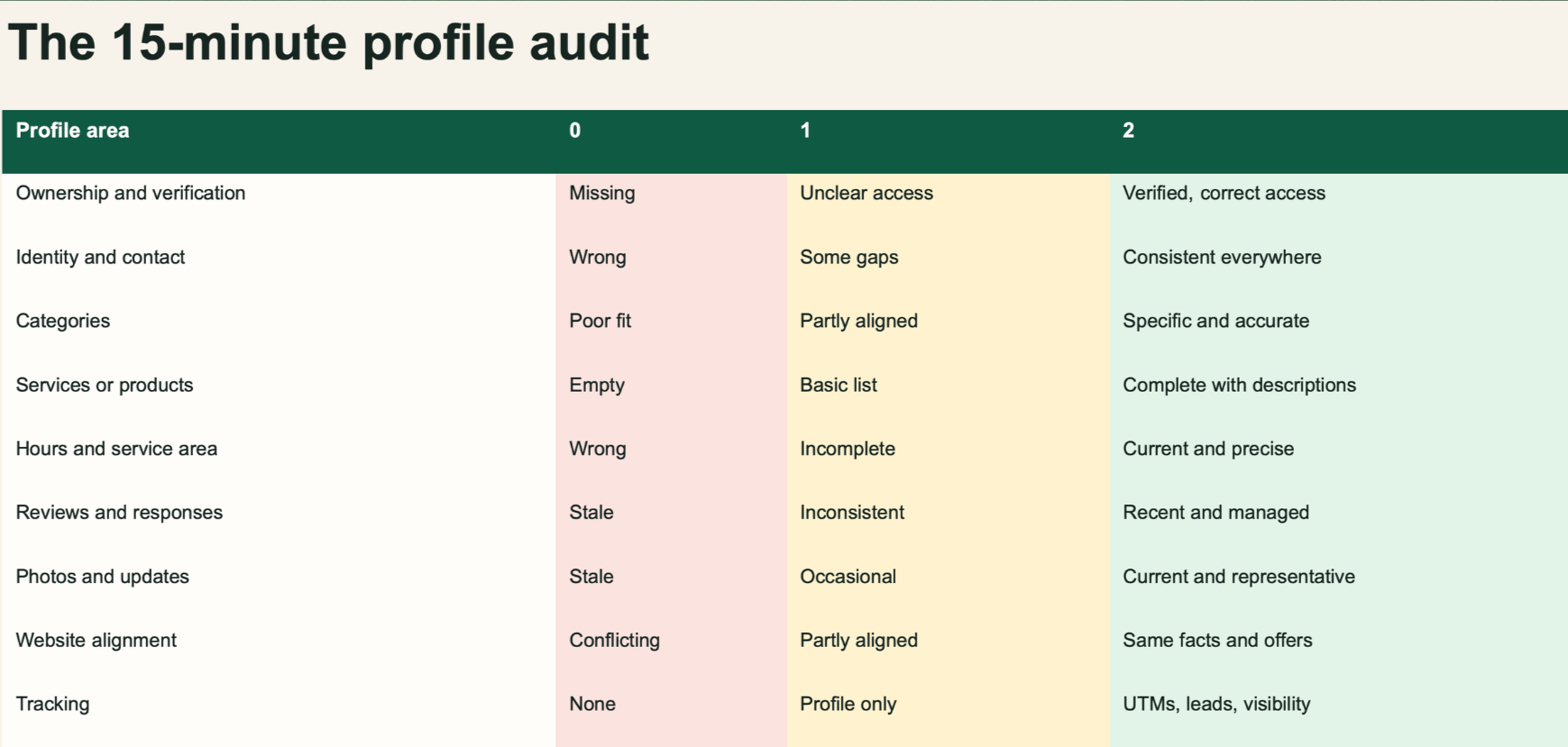
The webinar offered a simple way to prioritize: score each area 0, 1, or 2.
0: Missing, inaccurate, or neglected.
1: Present, but needs improvement.
2: Accurate, complete, and maintained.
Score your business information, categories, services, description, reviews, photos, posts, and directory consistency. Fix the zeros first.
Before making changes, record the performance data available in your profile, such as website clicks, call-button clicks, and direction requests. Review those indicators alongside actual inquiries and leads so you can assess business results.
Build a stronger foundation for local discovery

AI search adds another way for customers to discover businesses, while local SEO fundamentals remain relevant. Google says its existing SEO best practices apply to AI Overviews and AI Mode and recommends keeping Business Profile information up to date.
A complete profile cannot guarantee an AI mention. It can help customers find accurate information and make a more informed decision about contacting you.
Start with the basics: consistent business details, specific services, genuine reviews, and useful updates. Together, those improvements create a stronger foundation for local visibility.
Need help identifying your biggest opportunities? Emerald Creative Content can audit your business profiles and develop an SEO/AEO Blueprint to guide your next steps.